Choosing the right storage dedicated server is one of the most consequential infrastructure decisions a technical team will make. CPU and RAM define how much computing work a server can absorb, but storage decides how fast that server actually feels in practice how quickly a database returns a query, how fast a page loads, or how efficiently a backup job completes.
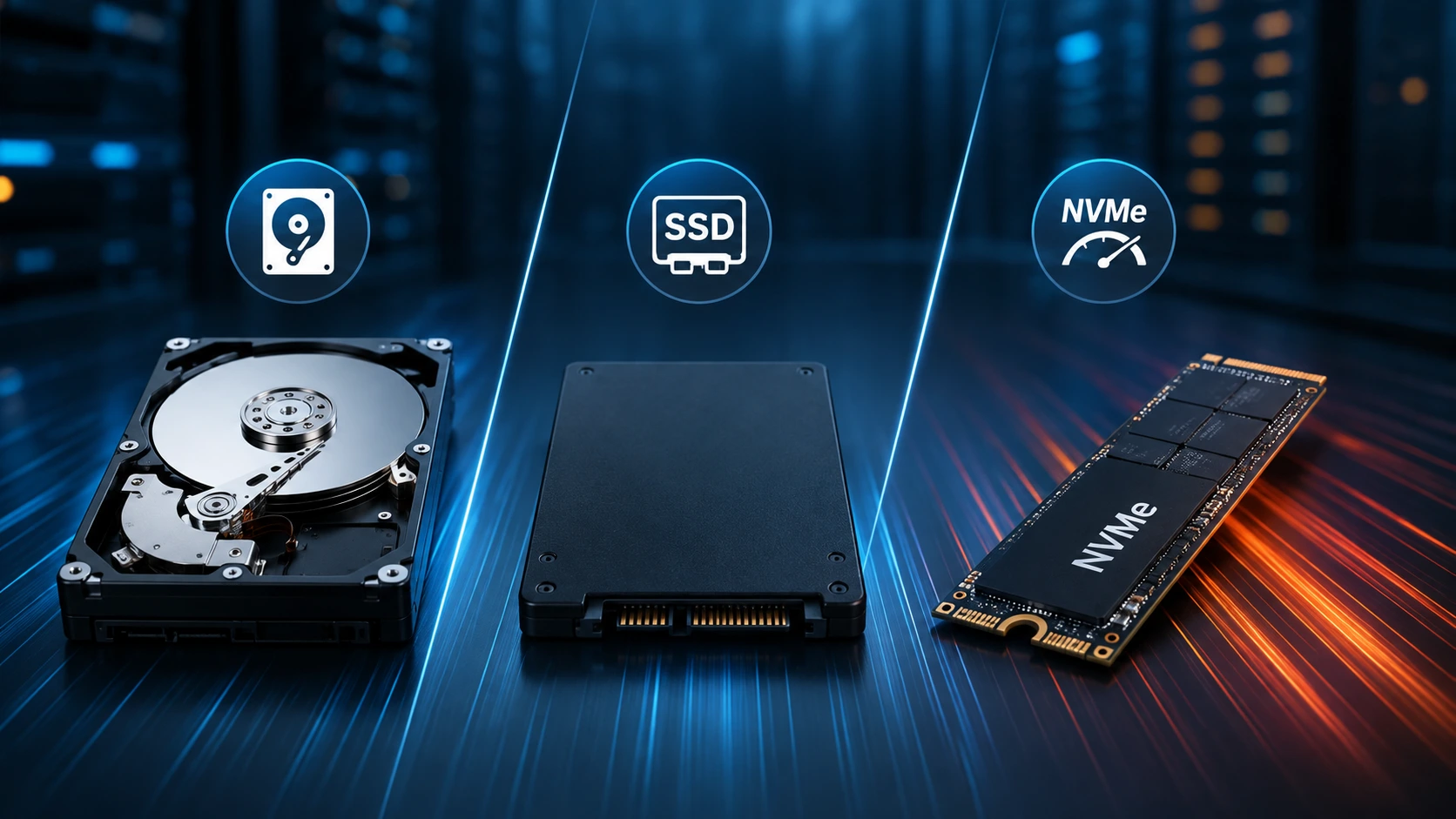
For most dedicated server buyers, the real decision comes down to three technologies: HDD, SATA SSD, and NVMe SSD. Each behaves differently under load, and each is a better or worse fit depending on the workload sitting on top of it.
This guide breaks down how HDD, SSD, and NVMe storage perform on a dedicated server, where each one earns its place, and how to match storage type to the workload you're actually running rather than defaulting to "the fastest drive available."
HDD vs SSD vs NVMe at a Glance
| Storage Type | Interface | Relative Performance | Capacity Potential | Best Fit |
|---|---|---|---|---|
| HDD | SATA / SAS | Lower, mechanical | Very high | Backups, archives, bulk/media storage |
| SATA SSD | SATA | High | High | Websites, apps, general-purpose hosting |
| NVMe SSD | PCIe | Very high | High | Databases, virtualization, high-I/O workloads |
What Is an HDD Dedicated Server?
A hard disk drive (HDD) stores data magnetically on spinning platters, with a mechanical arm physically moving across the disk to read and write. That mechanical step is the defining trait of HDD storage; it's also what separates it, performance-wise, from anything solid-state.
Where an HDD dedicated server still earns its place is capacity. Enterprise-grade HDDs deliver a low cost per terabyte that solid-state drives struggle to match, which makes them a sensible fit for backup repositories, document archives, surveillance footage, and large media library workloads where sequential throughput and raw capacity matter more than millisecond-level latency.
Where HDD storage holds up:
-
Low cost per TB at high capacity
-
Strong for large, sequential read/write jobs
-
A dependable option for backups and cold storage
-
Mature, broadly compatible technology
Where HDD storage falls short:
-
Seek time introduces latency that solid-state storage doesn't have
-
Weaker random I/O performance
-
Moving parts are more sensitive to physical shock and vibration
-
A poor match for I/O-heavy databases or virtualization
What Is an SSD Dedicated Server?
A solid-state drive (SSD) stores data in flash memory instead of on spinning platters, and because there's no mechanical seek involved, access latency drops sharply compared with HDD. That single architectural difference is why SSD dedicated servers feel noticeably more responsive under everyday load.
SATA SSDs are the common upgrade path for dedicated servers because they slot into existing SATA infrastructure while still delivering a meaningful performance jump over HDD. For website hosting, control panels, business applications, and general-purpose server workloads, SATA SSD storage tends to hit a practical balance of speed, capacity, and cost.
Where SSD storage holds up:
-
Far lower latency than HDD
-
Faster file and application access
-
Solid random I/O performance
-
No moving parts to wear down mechanically
-
A dependable default for general-purpose hosting
Where SSD storage falls short:
-
The SATA interface caps throughput below what PCIe-based NVMe can reach
-
Performance varies by drive model and controller
-
I/O-intensive workloads may outgrow it and need NVMe instead
What Is an NVMe Dedicated Server?
NVMe (Non-Volatile Memory Express) isn't a drive type so much as a storage protocol built specifically for flash memory, almost always deployed over PCIe rather than SATA. Because it talks directly over the PCIe bus with far less protocol overhead, an NVMe dedicated server can sustain much higher bandwidth and far lower queue latency than a SATA-based SSD.
In practice, that translates into very high IOPS and consistent low-latency performance under concurrent load — which is exactly what transactional databases, virtualization hosts, high-traffic web applications, analytics pipelines, caching layers, and game infrastructure tend to demand.
Where NVMe storage holds up:
-
Very high sequential and random I/O throughput
-
Extremely low storage latency
-
High IOPS under concurrent, multi-process load
-
The clear choice for databases and virtualization
-
Built for performance-sensitive, latency-intolerant applications
Where NVMe storage falls short:
-
Higher cost per TB than HDD
-
Overkill for purely archival storage needs
-
Endurance and sustained write performance still deserve scrutiny for write-heavy workloads
Performance: Where the Real Differences Show Up
The practical gap between HDD, SSD, and NVMe comes down to how fast each can respond to a storage request and how many of those requests it can juggle at once. HDD is bottlenecked by mechanical movement. SATA SSD removes that bottleneck entirely. NVMe goes a step further with a protocol and interface purpose-built for flash.
On a dedicated server, this difference shows up in database query response times, application startup, file access speed, virtualization responsiveness, cache hit performance, and general system responsiveness under load.
It's worth noting that raw sequential read/write speed is not the full picture. Random IOPS, latency under queue depth, sustained (not just burst) performance, and how well a drive handles concurrent workloads often matter more than the number on a spec sheet.
Matching Storage to Your Workload
Choose HDD when:
-
You need high capacity at the lowest cost per TB
-
The server's job is backups or archival storage
-
Your data access pattern is large and sequential
-
Peak I/O performance isn't the priority
Choose SATA SSD when:
-
You want a responsive, general-purpose dedicated server
-
You're hosting websites or standard business applications
-
You need a real step up from HDD without paying for NVMe-tier performance
-
Your I/O demand is moderate, not extreme
Choose NVMe when:
-
Low latency and high IOPS are non-negotiable
-
You're running transactional or high-concurrency databases
-
You're hosting VMs or containers with heavy storage activity
-
Your application does frequent, random reads and writes
-
You're running analytics, caching, or AI/ML pipelines
Best Storage by Workload
| Workload | Recommended Storage | Why |
|---|---|---|
| Website hosting | SATA SSD / NVMe | Faster page, app, and database access |
| Database server | NVMe | Low latency, high random I/O |
| Virtualization | NVMe | Handles concurrent VM storage load |
| Backup server | HDD / SSD | Capacity usually matters more than IOPS |
| Media storage | HDD / SSD | Capacity is typically the driving requirement |
| File server | HDD / SSD / NVMe | Depends on access frequency and concurrency |
| AI/ML workloads | NVMe | Faster dataset and checkpoint access |
| Analytics | NVMe / SSD | High I/O throughput speeds up processing |
Does NVMe Storage Actually Make a Server Faster?
NVMe can meaningfully speed up a dedicated server — but only for the parts of the workload that are actually storage-bound. If an application spends real time waiting on disk operations (databases are the textbook example, given how many random reads and writes they generate), moving to NVMe reduces that wait and improves throughput.
If the application is instead CPU-bound, memory-bound, or network-bound, upgrading storage alone won't move the needle much. The right first step is always identifying the actual bottleneck before paying for a higher storage tier.
How Storage Fits Into Overall Server Performance
Storage doesn't operate in isolation; it's one layer in a stack that includes CPU, RAM, and network capacity. CPU handles processing, RAM determines how much stays readily available in memory, network capacity governs data transfer in and out of the server, and storage determines how efficiently persistent data gets read and written.
That's why a well-balanced dedicated server configuration tends to outperform a server that simply has the fastest SSD installed with everything else left as an afterthought.
Capacity vs. Performance: What to Prioritize
Capacity and performance solve different problems, and it's worth estimating both before committing to a build.
If you're storing 20 TB of relatively inactive files, several high-capacity HDDs will usually be more practical than filling the chassis with premium NVMe drives. If your database only needs 1 TB but handles thousands of concurrent operations, NVMe is almost certainly the better investment.
Before ordering, it helps to map out:
-
Required usable capacity
-
Expected read/write ratio
-
Random vs. sequential I/O patterns
-
Peak IOPS requirements
-
Latency sensitivity
-
Expected daily data growth
-
Backup requirements
-
RAID or redundancy needs
-
Expected drive endurance under sustained writes
RAID and Redundancy
Picking a drive type is only half of designing resilient server storage. RAID configuration affects availability, performance, or both, depending on the level chosen. RAID 1 mirrors data for redundancy; RAID 10 combines mirroring and striping and is a common pick for workloads that need both speed and fault tolerance.
RAID is not a backup strategy on its own; a dedicated server still needs a separate, independent backup plan sized to how critical and how recoverable the data needs to be.
A Practical Framework for Choosing Storage
-
Start with the workload, not the drive spec. Is this a database, a website, a virtualization platform, a backup target, a file server, or a media platform?
-
Estimate capacity honestly. Add current usage to realistic growth, and leave headroom rather than provisioning to the edge.
-
Quantify the I/O requirement. Look past the advertised drive speed toward latency, IOPS, concurrency, and peak load.
-
Match storage to the actual bottleneck. Faster storage only helps if storage is what's slowing things down.
-
Plan redundancy and backups up front. RAID level, spare capacity, backup cadence, and recovery objectives all belong in the initial design, not an afterthought.
-
Evaluate the full server build. Storage decisions should be made alongside CPU, RAM, network, and OS choices, not in isolation.
Final Verdict: HDD, SSD, or NVMe?
There's no single winner across every situation. HDD remains the sensible choice when capacity and cost efficiency are what matter most. SATA SSD is a strong middle ground for general-purpose dedicated servers that need to feel responsive without a premium price tag. NVMe is the right call when low latency, high IOPS, and sustained throughput sit at the center of application performance.
For most performance-sensitive modern workloads, NVMe is worth evaluating first. For large-scale archival and backup storage, HDD still holds up as the more sensible option. And for a large share of websites and business applications, SATA SSD delivers a practical, cost-effective balance.
The best storage dedicated server is the one built around your workload, not simply the one running the fastest drive on the spec sheet.
Why Storage Choice Matters When Renting a Dedicated Server
When comparing providers, it pays to look past the storage label on a plan page. Ask which drive technology is actually installed, what interface it uses, how the RAID configuration is set up, and whether the server can be upgraded as requirements grow. These details have a direct, measurable effect on application performance, reliability, operating cost, and how well the server scales with you over time.
KW Servers builds dedicated server options around the workload they're meant to run, with HDD, SSD, and NVMe configurations available across CPU, RAM, network, and dedicated server locations tailored to different performance and budget requirements. Compare dedicated server configurations directly to see which storage tier fits your specific use case.
Frequently Asked Questions
Is NVMe better than SSD for a dedicated server?
NVMe is a category of solid-state storage that typically runs over PCIe, while conventional SSDs generally use SATA. NVMe usually delivers higher throughput, lower latency, and stronger I/O capability, making it the better fit for demanding workloads. SATA SSD can still be the smarter value choice for applications with lighter I/O needs.
Is HDD good for a dedicated server?
Yes, HDDs remain a solid choice for high-capacity storage, backups, archives, and any workload where capacity outweighs the need for low latency or high random I/O performance.
Which is best for a database: HDD, SSD, or NVMe?
For most performance-sensitive databases, NVMe is usually the stronger option, since databases generate substantial random I/O and benefit directly from lower storage latency. The ideal setup still depends on database size, query patterns, available memory, CPU, and concurrency.
Are NVMe dedicated servers worth the extra cost?
Often, yes, particularly when storage I/O is the actual performance bottleneck. For databases, virtualization, analytics, and other I/O-heavy workloads, the performance gain tends to justify the cost. For archival storage, the premium usually isn't worth paying for.
Should I choose more storage or faster storage?
It depends on the workload. Prioritize capacity if you're storing large volumes of relatively inactive data. Prioritize SSD or NVMe if applications access data frequently and storage latency is the thing holding performance back.
Does SSD improve website performance?
Yes, SSD storage generally improves server-side file and database access compared with HDD. The actual gain still depends on site architecture, caching, database workload, CPU, RAM, network capacity, and application code.
Conclusion
HDD, SSD, and NVMe each hold a legitimate place in dedicated server infrastructure, the right pick depends on how capacity, I/O performance, latency, reliability, and budget line up for your specific workload.
If economical high-capacity storage is the priority, HDD is still a relevant, defensible choice. If you need a balanced everyday server, SATA SSD is a practical fit. If your applications live or die by fast random I/O and low latency, NVMe is typically the strongest option available.
Evaluate the workload first, then choose the storage technology that removes the actual performance constraint; that approach produces a more efficient, more future-ready dedicated server than picking storage off a spec sheet alone.